
Turn your Excel project plan into a clear task timeline
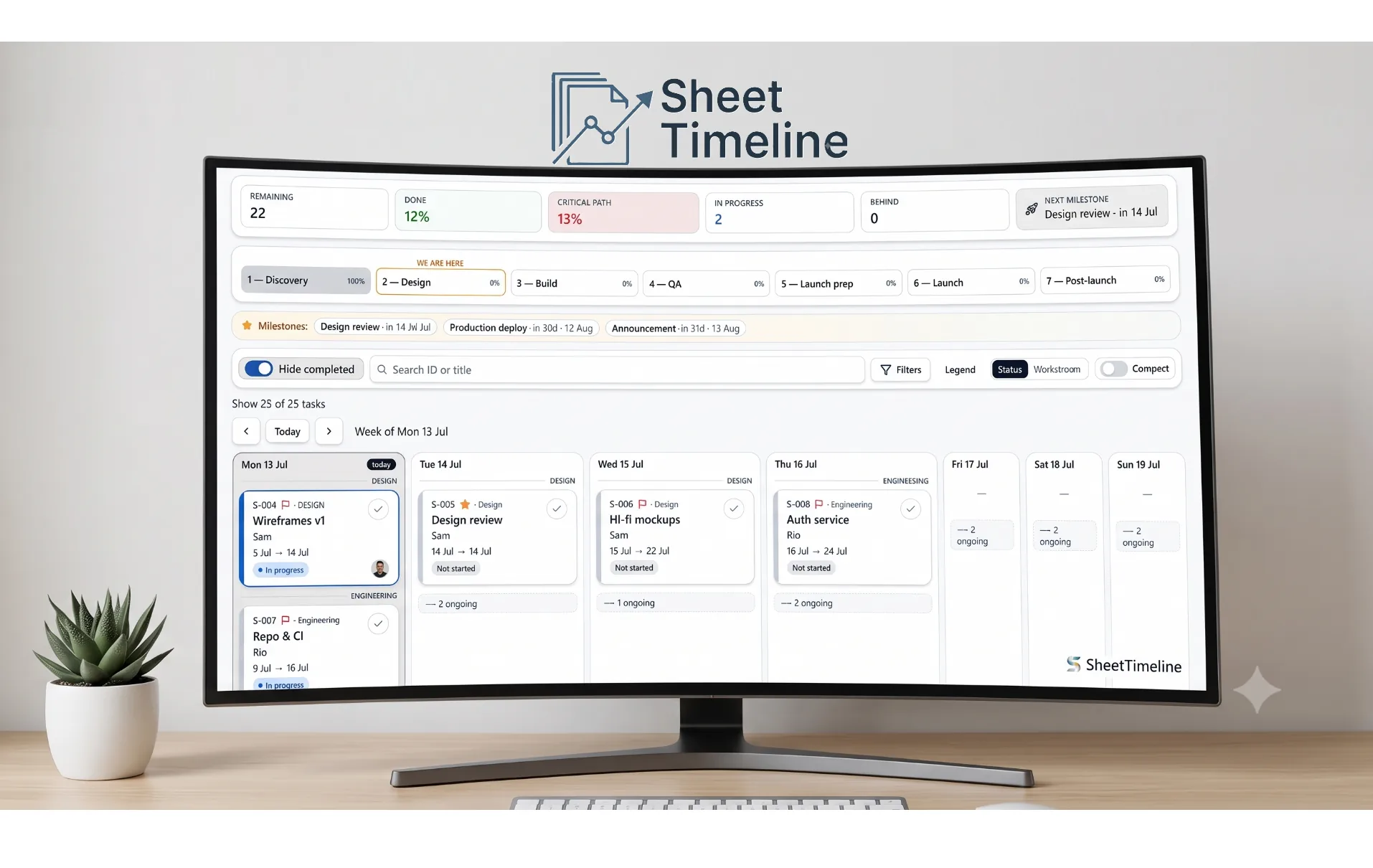
Load any .xlsx and instantly see it as a week board, day list, timeline, dependency network, or owner workload view — with milestones, critical path, and overdue flags. Edit statuses and notes in the browser, then export back to your own Excel file. Nothing leaves your computer.
How it works
- 01Load your plan
Drop in your .xlsx, download the free template, or try a sample dataset. The wizard maps your columns automatically the first time.
- 02See week, day, timeline, network, owner view
Switch between five views. Filter by workstream, stage, or owner. Spot what's overdue, what's next, and what's on the critical path.
- 03Export back to Excel
End your session and SheetTimeline writes your edits back into a new copy of your original file. Formulas and untouched columns stay byte-identical.
Everything you need to run the plan
A weekly view of what's happening now, next, and what slipped — with a "we are here" stage strip.
See dependencies and stage bars stretched across the calendar, grouped by epic when your plan has one.
A zoomable network diagram of every task dependency, with cycle warnings and the critical path highlighted.
See task density per owner per week, and click any cell to jump to that week in the timeline.
Capture a snapshot of the schedule, then compare any task's Start and End dates against that baseline to see slip or gain.
Highlighted milestones, next-up panel, and red-flag chips for critical-path tasks.
Instantly see behind-schedule work; filter to only critical or only in-progress tasks with one click.
Any Excel headers. A mapping wizard matches your columns and your status vocabulary — save it as a profile for next time. Learn how →
Edits go back into your own .xlsx. Formulas, formatting, and untouched cells stay exactly as you had them.
Everything runs in your browser. Your plan never leaves your computer. No account, no login.
No paywall on any view or export. Try it with the built-in sample dataset in one click.
SheetTimeline parses your .xlsx in the browser using local JavaScript. There is no server upload of your plan. Edits are stored locally in your browser's IndexedDB until you export them back into a new copy of your file. The only network calls the landing page makes are anonymous visitor and session counters — no filenames, no task data, no plan content attached.
Questions people ask
Can I see my Excel project plan as a timeline?+
Yes. SheetTimeline turns any .xlsx project plan into a week board, day list, Gantt-style timeline, dependency network, and owner-focused task list — no re-typing, no re-modeling.
Does my spreadsheet get uploaded to a server?+
No. Your file is read entirely in your browser. Nothing about your plan — filenames, tasks, dates, or notes — is sent anywhere. The only network calls we make from the landing page are anonymous visitor and session counters (no plan data attached).
Do I need Microsoft Project or any special tool?+
No. SheetTimeline works with plain Excel .xlsx files. If you can put your tasks in a spreadsheet, you can view them here.
What format does my plan need to be in?+
The only required columns are ID, Title, and Status. Everything else — Start, End, Stage, Workstream, Owner, Milestone, Critical Path, Depends on, Notes — is optional. A mapping wizard walks you through matching your column names to ours the first time.
Is it free?+
Yes, SheetTimeline is free to use today. Load your plan, view it, edit statuses and notes, and export back to Excel without paying anything.
Can my team use our own status names?+
Yes. The mapping wizard lets you map your raw status labels (e.g. "In flight", "On hold", "Complete") to our five canonical states, and the export writes back your original vocabulary — not ours.
What happens to my edits when I export?+
SheetTimeline writes edited cells back into a new copy of your original .xlsx. Formulas, formatting, and untouched columns stay byte-identical. Notes are appended, other columns are left alone.
Can I add tasks that aren't in my spreadsheet yet?+
Yes. Click "+ New task" in the app header to add a task on the fly — it shows up on the week board, day list, and timeline immediately. When you end your session, new tasks are appended as fresh rows at the bottom of your original .xlsx alongside your other edits; existing rows stay untouched.
Can owners see only their own tasks?+
Yes. The Owner view lets you pick one or more owners, choose a horizon (2 weeks, 4 weeks, or all open work), and see a grouped list of overdue, this-week, later, and undated tasks. It also includes a workload heatmap that shows how many tasks each owner has each week.
Can I track how the schedule slips over time?+
Yes. Use Settings to capture a baseline snapshot of the current schedule. Then, whenever you open a task in the drawer, you'll see the variance in Start and End dates compared to that baseline.
Do I need to sign in?+
No account, no login. Your session lives in your browser only.
More detail lives in the full user guide.
Ready to see your plan?
One click. No signup. Your file stays on your machine.